GAME GUIDE
Shopping Mall Maker Placement, Reroll, and Scoring Guide
Build a 13-slot mall by comparing store offers and spaces. Learn when to use the three rerolls, read the estimated report, and improve the seven scoring categories.
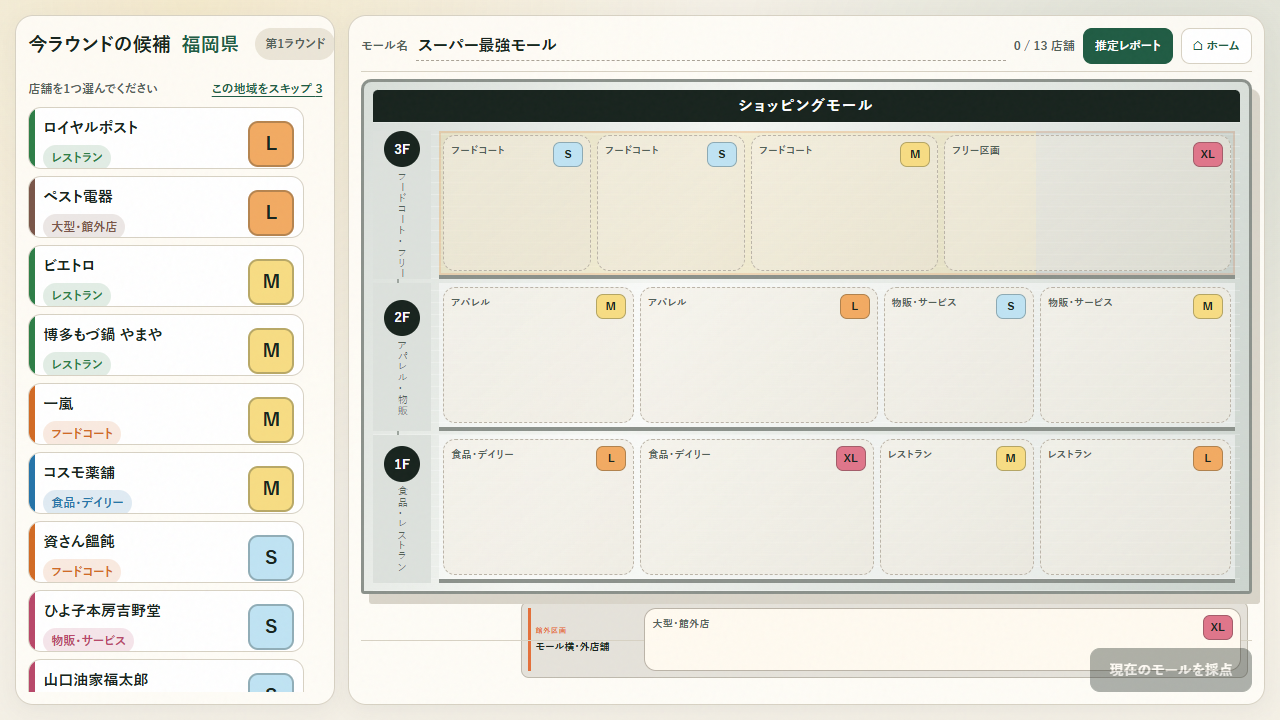
Complete a mall in 13 rounds
Each round draws a region. Choose one of its store offers and place it in an empty slot. There are twelve slots across three floors and one outside slot, for thirteen in total. Compare placement requirements, customer draw, and combinations as well as individual sales figures.
Sales, costs, and customer figures are in-game estimates. They are not the actual results of the named companies or stores and should not be used for real-world business decisions.
Place your first store step by step
- Start and wait for the regional draw, then inspect the offers.
- Check the types and sizes of empty slots before choosing. The third floor includes food-court slots, the second includes apparel, and the first includes daily-shopping and restaurant slots.
- Click or tap a store offer, then choose a compatible empty slot. Clicking a slot before selecting a store does not place anything.
- Placement advances the round. Open the estimated report to review indicators as you work toward thirteen stores.
If a store cannot fit despite an empty space, check its size and slot requirements. You can compare offers by changing the selection before placing one. Decide on a destination first.
Use the three rerolls with a purpose
You have three rerolls per run. Before spending one in search of a more attractive store, check whether the current offers fit your remaining spaces. Using every reroll early leaves none for later rounds with fewer placement options.
For example, if you still need to fill a restaurant slot, check the candidate's size rather than choosing solely by its sales figure. Before rerolling, identify a store you could place now, the slot you want to preserve, and the indicator you need to improve.
The total combines seven categories
The report and final breakdown use these seven categories. Profit carries the largest weight, but cannot provide the whole score on its own.
| Category | Maximum points | What to review |
|---|---|---|
| Operating profit | 30,000 | Margin and costs as well as sales |
| Footfall | 18,000 | Stores with customer-drawing power |
| Satisfaction | 14,000 | Audience, repeat visits, and noise |
| Layout compatibility | 14,000 | Slot fit and combinations |
| Business diversity | 9,000 | Balance between categories |
| Resilience | 8,000 | Weekday, weekend, and bad-weather strength |
| Social buzz | 7,000 | Store buzz and combinations |
The maximum total is 100,000 points. Each category is capped, so review low categories in the completed mall rather than repeatedly improving only one strong area.
A placement exercise
In your first run, finish the mall with compatible offers and review profit and layout compatibility. In the next run, pay more attention to adjacent stores and same-floor combinations, checking the combo display. Different draws change the result, so a single score difference does not establish that one layout is better.
Collecting only similar stores can overlook diversity and competition effects. Compare an offer's individual figures with its relationship to stores already placed. If a high-sales store fails to improve the overall evaluation, inspect the score breakdown and combinations first.